

I found myself with this exact issue last night after clicking a routine update notification. I was sitting at my desk, minding my own business, when the new ComfyUI 0.24.1 software refresh completely severed my remote workstation pipeline. One minute you are rendering locally, and the next you are entirely locked out of your own rig.
The latest patch for our favorite localhost restriction, completely ignoring the fact that many of us do not sit directly in front of our server towers all day. When an interface update actively breaks your established workflow without warning, the convenience of a one-click desktop installer vanishes entirely.
Blindly updating your software stack is a phenomenal way to burn an evening troubleshooting.
My son usually dominates our high-bandwidth pipelines with his gaming habits, but even his setup gets isolated when local routing tables get silently rewritten. The cause and effect here is incredibly simple, since an undocumented change in app architecture leads directly to broken local accessibility.
Finding the Flags Inside the Instance Manager
Fortunately, digging through the newly minted configuration menus reveals that the underlying functionality is still alive. The developers buried the network listening controls deep inside a new instance selector button located right in the main window title bar. You have to open the specific instance pane, navigate over to the startup arguments tab, and manually toggle the raw parameters back into existence.
Fixing the problem requires manually forcing the application to listen to the correct address again.
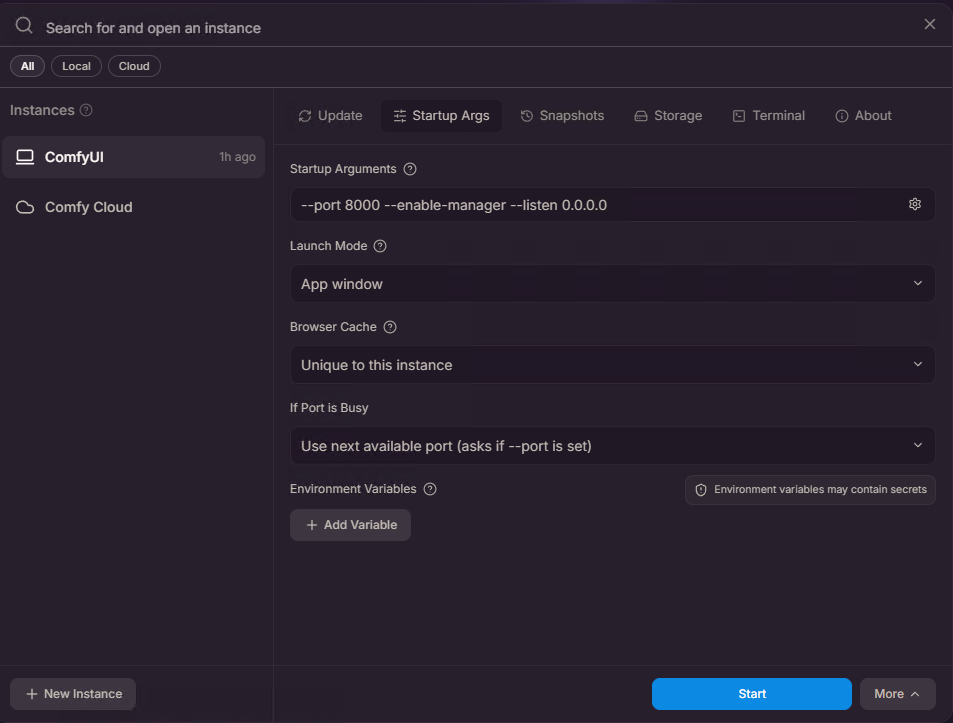
Activating the listen argument and adding the 0.0.0.0 address string back into the raw argument list immediately restores the pipeline across your local network. It is a relief to see that we do not have to permanently downgrade our installations just to keep using our favorite independent generation tools.
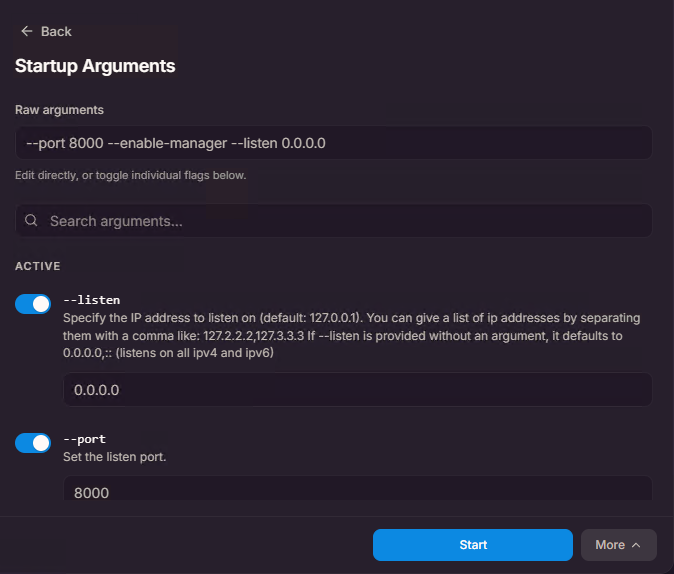
Once you check that specific box and restart the execution loop, the remote browser connects smoothly without any further complaints.
The Value of Independent Hosting Control
This entire hiccup is a gentle reminder of why keeping our workflows independently hosted matters so much in the first place. When you control the hardware and understand the underlying startup scripts, a broken interface update is just a temporary annoyance rather than a permanent loss of service.
We own the infrastructure, so we get to fix the plumbing ourselves.
The
ComfyUIdesktop upgradeshome-labLAN configurationlocal networkmulti-device workflownode-based UIremote accessSoftware UpdateTroubleshooting

Laronski
Website: http://GigCityGeek.com





Leave a Reply