

Let’s be real: the tools we use to organize our lives often end up driving us closer to chaos. How many of you have opened Microsoft OneNote, stared at the clutter of various pages and sections, and wondered if there’s something better out there?
If you’re a productivity junkie like me, you’ve probably tried everything from Notion to Evernote, only to come back to OneNote for its familiarity and functionality—even though it feels like it’s been stuck in 2015.
But here’s the thing: there is a tool that not only matches OneNote but surpasses it in almost every way. It’s called Notesnook, and I’d wager this app could turn any organized-mess-lover into a streamlined productivity wizard.
Here’s why.
A Fresh Coat of Magic Paint
Let’s start simple: design. Ever notice how most open-source apps are about as visually appealing as a utility bill? Sure, they get the job done, but they don’t “spark joy,” if you will.
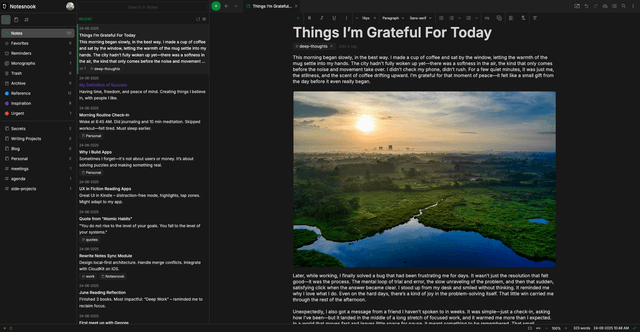
Notesnook, however, has undergone a transformation. What used to look outdated now boasts a clean, modern interface with customizable themes that make your workspace feel, well, yours. Unlike OneNote, which forces you to navigate between “not this purple” or “not that purple,” Notesnook allows you to mix and match accent colors like you’re an interior designer for your own productivity palace.
Good tools should inspire, not exhaust, and this redesign does the former with ease. It’s like giving your notes a personal stylist.
Markdown: The Keyboard Shortcut You Didn’t Know You Needed
Sure, OneNote lets you bold and italicize text easily. But have you ever tried doing anything beyond that? Spoiler alert: it’s not pretty.
Notesnook, on the other hand, unlocks a new speed of typing efficiency with its flawless Markdown support. Imagine being able to whip up a structured, well-formatted document without having to touch your mouse. Any techie who juggles code snippets or formatting preferences (you know who you are) will appreciate this feature immensely.
A little bit of keyboard and Markdown magic, and boom—your workflow’s been upgraded. This is the note-taking equivalent of discovering Ctrl+C, Ctrl+V for the first time.
Making Sure You Actually Remember Stuff
If you’ve ever relied on OneNote to remind you of something, chances are, you’re also the proud owner of a collection of forgotten “urgent” notes. I’ve had literal calendar events draped in neon-colored digital highlighter that I still forgot to check.
In Notesnook, reminders are seamlessly built into the app itself. You can slap a reminder onto a note and actually get a notification when you need it. Set it to recur for daily habits or monthly bills, and suddenly, Notesnook transforms from a static brain-dump to an actual task manager.
Sure, it won’t replace your full-blown project management tools, but it steps up when OneNote steps out. Remembering to remember just got a whole lot easier.
Organize Like You Mean It
Microsoft’s notebooks, sections, and pages work, but let’s not kid ourselves—they stop being practical the second chaos creeps in.
Notesnook takes organization up a notch with tags, favorites, and color-coded notes. Planning a trip? Tag your notes with #travel and #itinerary. Working on a project? Mark critical notes as “favorites” so they’re front and center.
Need a quick visual cue? Assign colors to notes for instant recognition. For visual thinkers (or anyone drowning in digital chaos), this small touch can be a lifesaver. OneNote may be a decent filing cabinet, but Notesnook feels like it was crafted by an artisan.
Tags might seem small, but they’re secretly life-changing.
Encrypted, Private—and Open-Source to Boot
Privacy might be the one feature you didn’t realize you desperately needed in a note-taking app. OneNote isn’t exactly a data-fortress, and let’s be honest, Microsoft isn’t in the business of not knowing about you.
Notesnook flips the script with end-to-end encryption and open-source transparency. Want to know exactly how your data is being handled? The full code is right there to inspect.
This isn’t just about convenience; it’s about trust. Notesnook guarantees that even they can’t access your thoughts—or your terrible attempts at haikus. No snooping. Just notes. How refreshing is that?
If you’re tired of squeezing life out of a tool that feels frozen in time, Notesnook might be what you’ve been searching for—privacy, productivity, and modernity all wrapped up in a single app.
Whether you’re a OneNote loyalist ready for a glow-up or a productivity adventurer forever in search of the next best thing, this app demands a spot on your radar.










Leave a Reply